
Emergent AI Review 2026: Is It Worth It?
Emergent turns plain-English descriptions into working web and mobile applications. We reviewed the platform's workflow, verified its current pricing, and mapped out exactly who it suits — and who should be careful with its credit system.
Disclosure: this review contains affiliate links. If you sign up through them, Toolstacker may earn a commission at no extra cost to you. Toolstacker is an independent publisher and is not Emergent's official website; commissions do not influence our conclusions.
A capable AI app builder — if you respect the credit meter
Emergent is one of the few AI builders that genuinely spans web apps, mobile apps, and landing pages in one workspace. Its strongest selling point is how quickly a written idea becomes a running application. Its biggest limitation is economic, not technical: credit consumption is hard to predict, and the subscription price alone does not represent the total cost of building and maintaining an app.
- Best for
- Founders validating MVPs, non-technical builders, and teams shipping internal tools fast.
- Be cautious if
- You handle sensitive data, need deep customization, or have a tight, fixed budget.
- Strongest point
- Idea → running app (web or mobile) in a single conversational workflow.
- Biggest limitation
- Unpredictable credit burn, plus deployment and hosting credit usage that is separate from the subscription fee.
What Is Emergent AI?
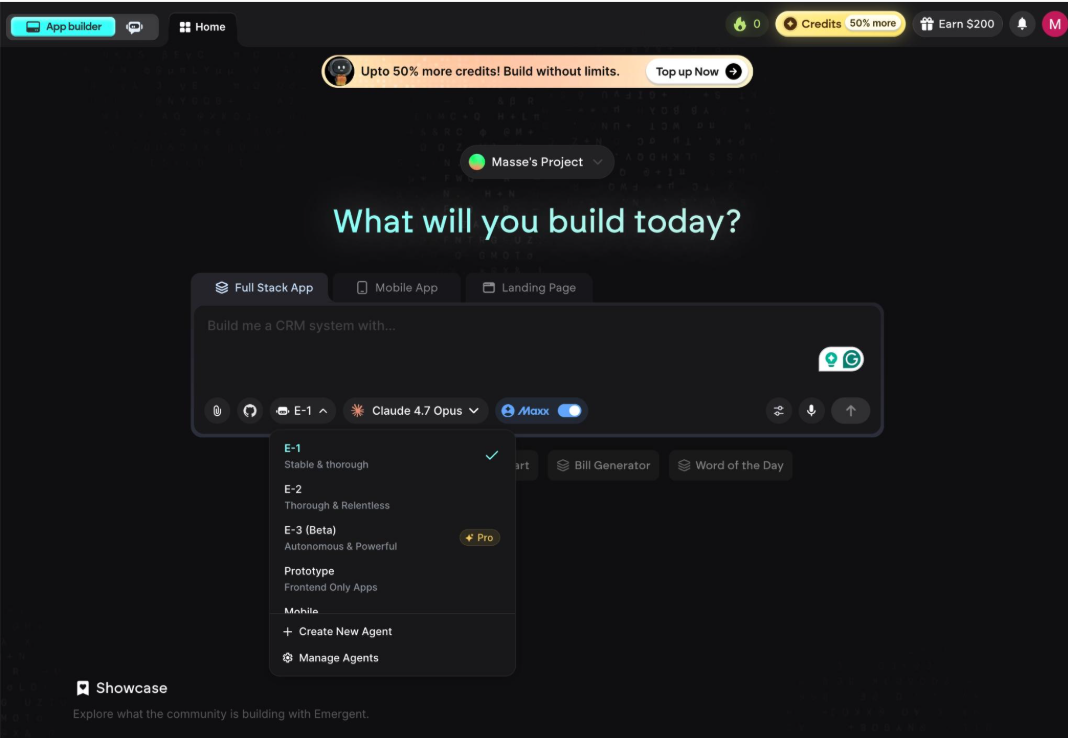
Emergent is an AI application builder. Instead of writing code or dragging blocks in a traditional no-code editor, you describe the application you want in natural language — "a CRM for my cleaning business," "a habit tracker mobile app" — and AI agents design, write, and wire up the application for you.
Under the hood, the platform covers the full stack: frontend, backend, database, authentication, and deployment. That puts it between two worlds. Compared to traditional coding, it removes most of the manual implementation work. Compared to conventional no-code builders, you are not assembling components by hand — you are directing an agent that writes real code, which you can later push to GitHub.
The workspace supports three project types: full-stack web apps, mobile apps, and landing pages, with different agents (including a prototyping mode and more autonomous tiers) available depending on your plan.
How Does Emergent Work?
The workflow inside Emergent follows five stages:
- Describe your idea. You write a prompt describing the app, pick the project type (Full Stack App, Mobile App, or Landing Page), and choose an agent.
- Generate the first version. The agent plans the app, writes the code, and produces a working initial build.
- Review and refine. You inspect the result in the preview and ask for changes in conversation — each revision consumes credits.
- Test and debug. You exercise the app, report issues, and the agent attempts fixes. Complex bugs can take several rounds.
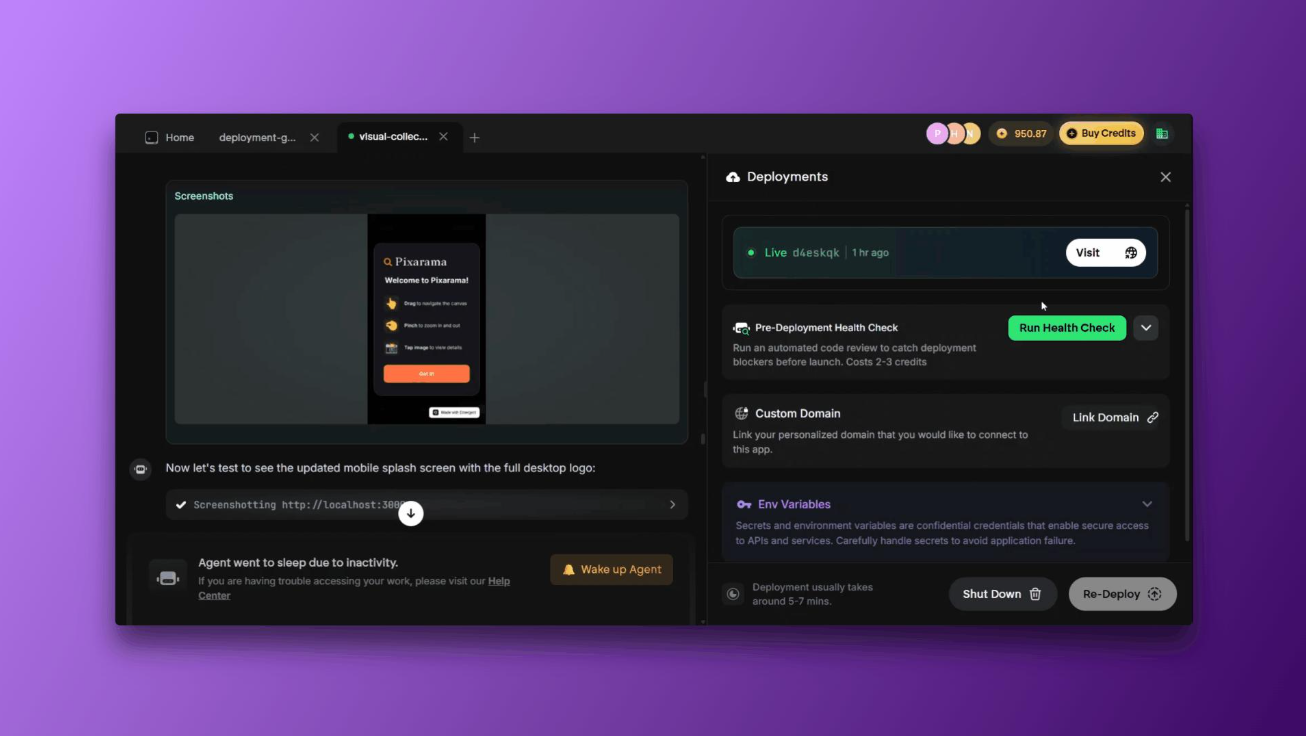
- Deploy when ready. You publish through the Deployments panel, optionally run a pre-deployment health check, and connect a custom domain.
What should you expect? The first generation is usually fast and impressive. The refinement loop is where time and credits go: results depend heavily on prompt quality, project complexity, the integrations you need, and how much testing you do before calling it done.
What Can You Build With Emergent?
Emergent targets a broad range of application types. The use cases where the platform is most relevant:
- SaaS MVPs — validate a product idea before hiring developers.
- Business dashboards — KPI tracking and reporting views for internal teams.
- Internal tools — CRMs, inventory trackers, workflow apps built around your process.
- Customer portals — authenticated spaces for clients to log in and self-serve.
- Booking and workflow apps — scheduling, approvals, and form-driven processes.
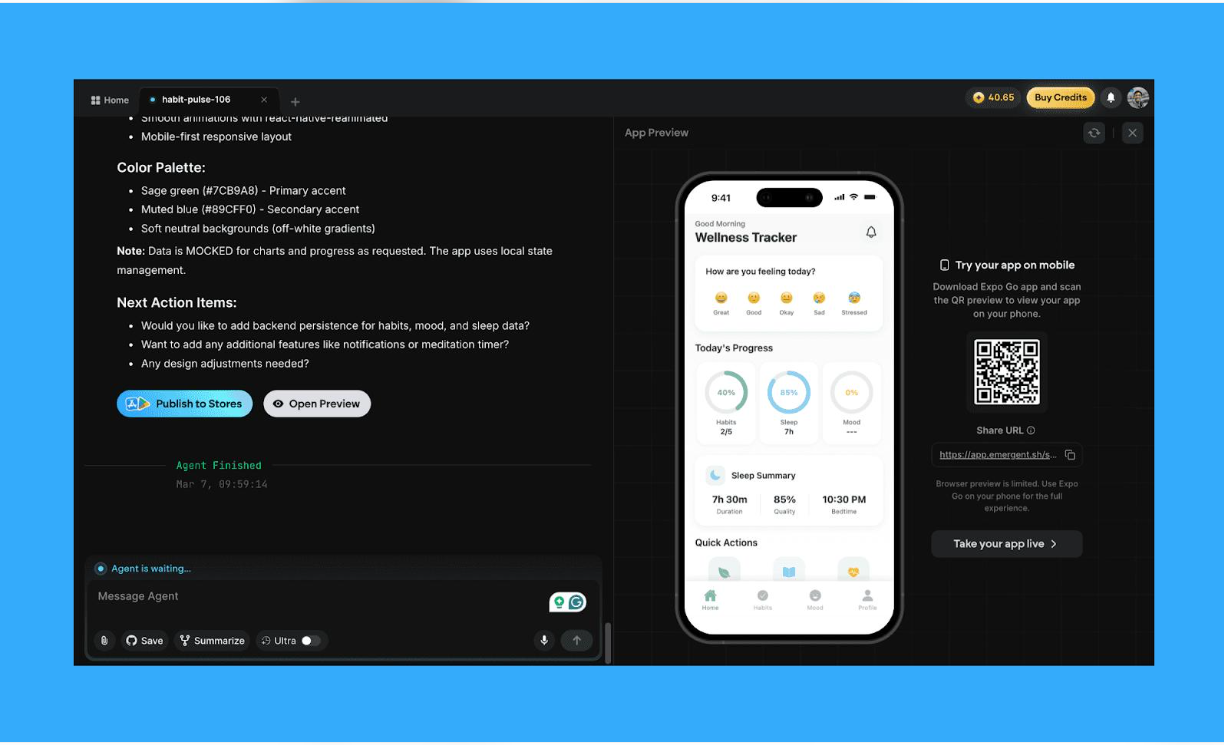
- Mobile applications — with a phone preview in the browser and an Expo Go QR flow for on-device testing.
Emergent also maintains a public showcase of community-built projects, which is the best place to calibrate your expectations: look at what real users shipped, not just the marketing demos.
A practical example: a small-business CRM
To make the workflow concrete, here is how a small business owner — say, the owner of a cleaning company — might realistically build a simple CRM with Emergent:
- Prompting. Instead of "build me a CRM," write a specific brief: "A CRM for my cleaning company. I need a customer list with contact details and addresses, a job schedule view, a way to mark jobs as quoted / booked / completed, and a simple dashboard showing this week's jobs." Specificity here is the single biggest lever on output quality.
- Generation. Choose Full Stack App, pick an agent, and let it produce the first working version — screens, database, and login included.
- Refinement. Review the result and request changes in conversation, batched into precise requests: "Add a notes field to each customer" and "Let me filter jobs by status" as separate, deliberate rounds — each revision consumes credits.
- Testing. Click through the real flows yourself: add a customer, schedule a job, log in as a second user. Report anything broken and let the agent attempt fixes.
- Deployment. When it works, publish through the Deployments panel, run the pre-deployment health check, and optionally connect a custom domain.
We are deliberately not quoting how many credits this example would consume or how long it would take — Emergent publishes no fixed per-action consumption table, and results vary with prompt quality and project complexity. The honest advice: run exactly this kind of small, real project on the Free plan first and measure your own numbers.
Key Features, Evaluated
Emergent's feature list is long. These are the capabilities that actually matter when deciding whether to pay, based on the current product and documentation:
AI-assisted application generation
What it does: Turns a written description into a working full-stack application. Why it matters: It compresses weeks of scaffolding into minutes. Limitation: output quality scales with prompt quality — vague prompts produce generic apps that cost credits to fix.
Frontend, backend, database, and authentication
What it does: The agent wires up the full stack, including data storage and user login, not just the visual layer. Why it matters: many AI builders stop at the frontend. Limitation: generated backends still need a security review before real users touch them (see the security section below).
Mobile app workflow
What it does: Builds mobile apps with an in-browser phone preview, an Expo Go QR flow for testing on your own device, and a "Publish to Stores" action. Why it matters: mobile is where most AI builders are weakest. Limitation: the browser preview is limited — the product itself tells you to use Expo Go for the full experience — and App Store / Google Play approval is still your responsibility.
Editing and refinement
What it does: You iterate conversationally — describe a change, the agent applies it. Why it matters: this is the core daily loop. Limitation: every revision consumes credits, and repeated fixes to the same problem can burn through a monthly allowance faster than expected.
GitHub integration and code ownership
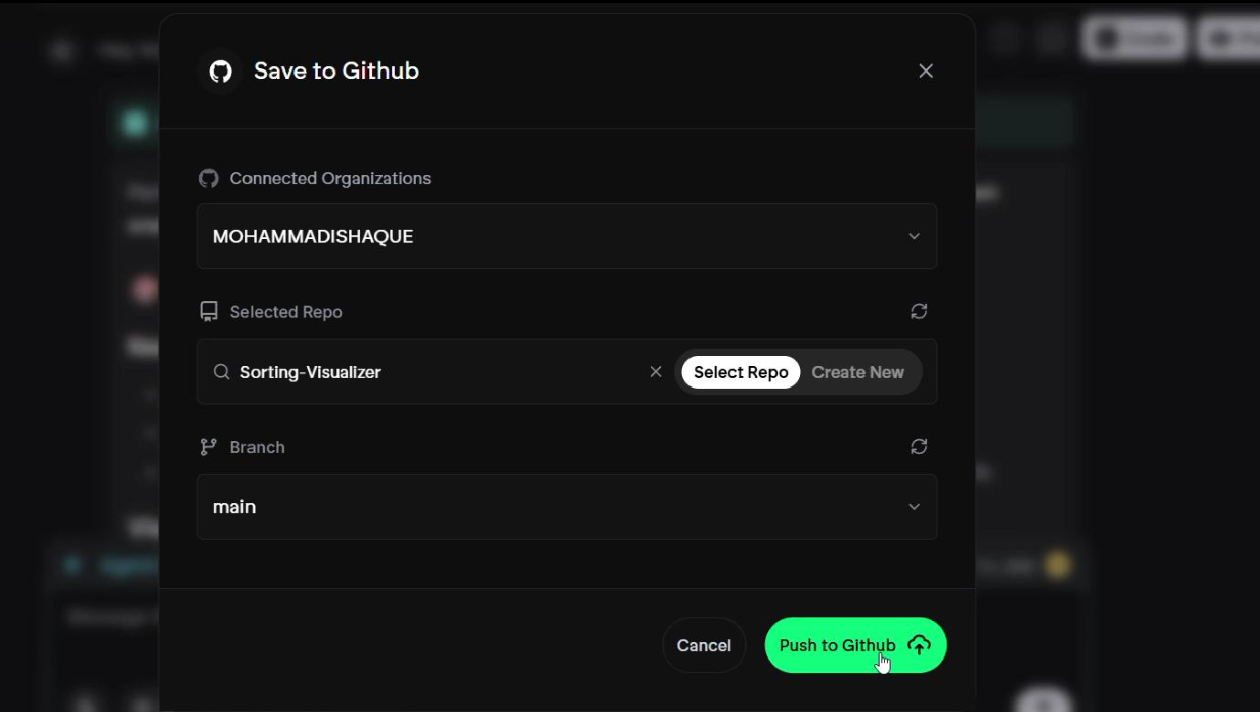
What it does: On paid plans, you can connect a GitHub organization, select or create a repository, and push your project to a branch. Why it matters: it gives you a copy of your code outside the platform — essential for backups, audits, and an exit strategy. Limitation: it is a paid-plan feature, so Free-tier projects stay inside Emergent.
Deployment and hosting
What it does: A Deployments panel handles going live, with a pre-deployment health check (the product notes this costs roughly 2–3 credits), custom domain linking, environment variable management, and re-deploy / shut-down controls. Why it matters: deployment is integrated rather than exported to a separate host. Limitation: deployment and hosting-related actions also consume credits, separately from the subscription fee. Emergent does not publish a fixed per-action table for hosting consumption, so verify current deployment costs in the official documentation before keeping multiple apps live.
Want to test the workflow before paying?
The Free plan includes 10 monthly credits — enough to describe a real idea and see what the agent produces.
Emergent Pricing and Credits
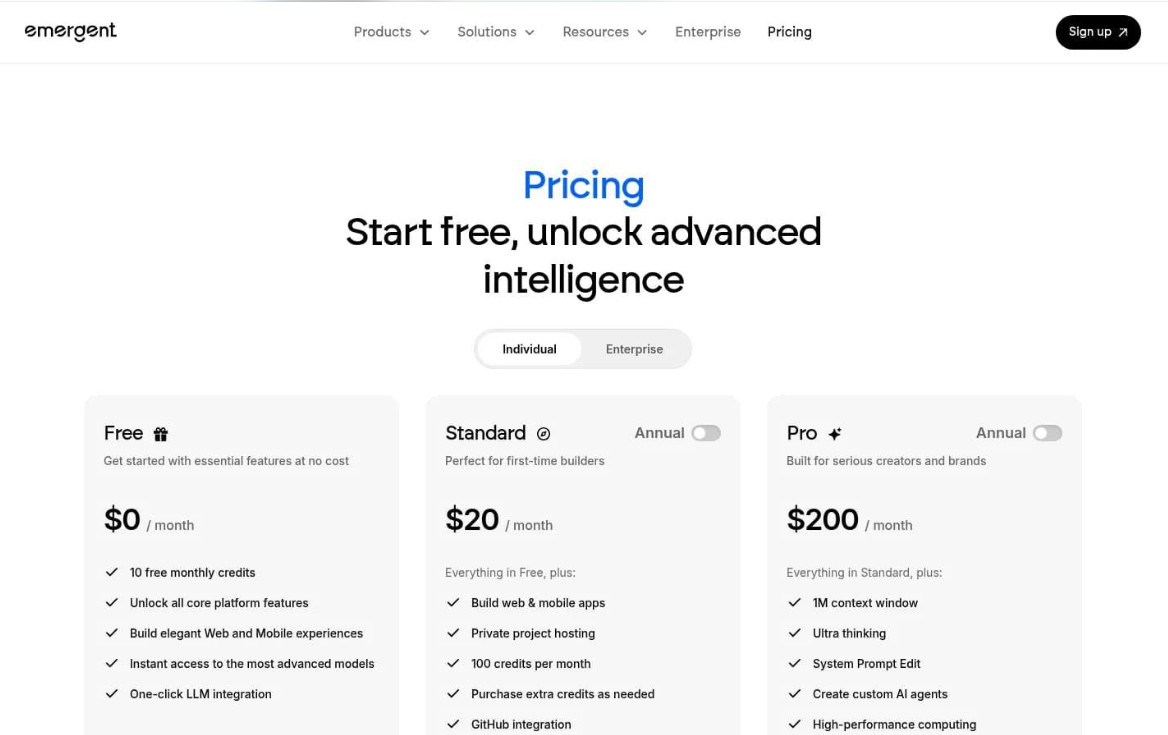
This is the section that decides whether Emergent makes sense for you, so we verified it against the official pricing page on November 2, 2026. Emergent lists three individual tiers plus custom Business and Enterprise plans:
| Plan | Monthly | Annual (per month) | Monthly credits |
|---|---|---|---|
| Free | $0 | — | 10 |
| Standard | $20 | $17 | 100 |
| Pro | $200 | $167 | 750 |
| Business / Enterprise | Custom | Custom | Custom |
Standard adds private project hosting, GitHub integration, and the ability to purchase extra credits. Pro adds a 1M-token context window, custom AI agents, priority support, and the larger 750-credit allowance. Business adds role-based access control, SSO, and shared team workspaces; Enterprise adds self-hosted database support, audit logs, and VPC deployment.
The real cost is not the subscription price
The subscription price alone may not represent the total cost of building and maintaining an application. Building consumes credits, fixing consumes credits, and deployment and hosting actions consume credits too. Paid plans let you buy additional credits when you run out — which means a complex project can cost meaningfully more than the plan's sticker price. Emergent does not publish a fixed per-action credit table, so treat your first project as a calibration run before committing to annual billing. Credit rollover rules were not clearly verifiable at review time; check the official plans-and-credits help page before assuming unused credits carry over.
Three separate costs to budget for
Emergent's pricing is easier to reason about when you split it into three distinct buckets:
- The subscription. A fixed monthly or annual fee (Free, Standard, or Pro) that unlocks plan features and a monthly credit allowance.
- AI building credits. The agent's work — generating, revising, and debugging your app — draws from your monthly credit allowance, and paid plans let you purchase additional credits when you run out.
- Deployment and hosting. Actions in the Deployments panel (such as the pre-deployment health check, which the product notes costs roughly 2–3 credits) and hosting-related usage also draw on credits, separately from the subscription fee. Emergent does not publish a fixed hosting consumption table, so confirm current rates in the official docs and the pricing page before keeping apps live long-term.
Pros and Cons
Pros
- Faster initial development — idea to running app in one session.
- Natural-language workflow — no code required to get a first version.
- Broad coverage — web apps, mobile apps, and landing pages in one workspace.
- Full-stack output — backend, database, and auth included, not just screens.
- GitHub export on paid plans — real code ownership and an exit path.
- Integrated deployment with health checks and custom domains.
Cons
- Credit consumption is difficult to predict before you start.
- Repeated fixes and revisions consume additional credits.
- Complex applications still require manual refinement and testing.
- Design output may need extra polish for customer-facing products.
- Production use requires your own security and quality checks.
- Ongoing hosting and maintenance costs sit on top of the subscription.
Is Emergent Worth the Money?
Value for money with Emergent is not about the $20 or $200 sticker — it is about how many credits your project actually consumes. The math works in your favor when:
- You are validating an idea — a working MVP for $20–$200 beats a five-figure development quote.
- Your app is well-specified — detailed prompts produce better first versions and fewer paid revisions.
- You build internal tools — where "good enough and fast" beats "perfect and slow."
The math works against you when:
- Your project is complex and exploratory — every wrong turn costs credits.
- You need heavy iteration — debugging loops are the biggest credit sink.
- You plan to keep many apps live — deployment and hosting credit usage is separate from the subscription and not fully predictable.
At some level of complexity, hiring a developer or using a more deterministic platform becomes cheaper than feeding the credit meter. That threshold is different for every project — which is exactly why the Free plan exists: use it to measure your own consumption before subscribing.
Who Should Use Emergent?
- Founders and entrepreneurs: strong fit. Test a business idea with a real, working product before committing serious money.
- Non-technical builders: good fit with patience. You can get far without code, but budget time for learning how to prompt and review output.
- Developers: useful as an accelerator. The GitHub export means you can take the generated code and continue in your own stack.
- Small teams: strong fit for internal tools and dashboards that would never justify a development budget.
- Businesses building internal tools: arguably the sweet spot — real business value, moderate polish requirements, controlled user counts.
Who should be cautious: anyone building applications that handle sensitive personal, financial, or health data, and anyone whose product requires extensive custom behavior. AI-generated code needs professional security review before it touches real customer data, and deep customization can turn the credit meter into a running cost you did not plan for.
Emergent vs Alternatives
No AI builder wins every category. Here is how Emergent compares to the tools buyers most often weigh it against — assess each on your own project rather than looking for a universal winner:
| Tool | Focus | Code access | Best reason to choose it | Main trade-off |
|---|---|---|---|---|
| Emergent | Web + mobile apps, landing pages, agents | GitHub export (paid) | Mobile output and full-stack scope in one conversational workspace | Credit consumption is hard to predict before you start |
| Lovable | Web apps with a strong visual editing loop | GitHub sync | Polished web-app editing experience for web-first founders | No native mobile app output |
| Replit | Full development environment with AI agent | Full — it is an IDE | A complete coding environment with AI assistance built in | Assumes more technical comfort than prompt-only builders |
| Base44 | All-in-one web app building | Limited | Simple path for non-technical founders shipping basic web apps | Limited code access restricts customization and exit options |
| Bubble | Mature visual no-code platform | No traditional code export | A decade of plugins, templates, and community knowledge | Steeper learning curve and no conventional code export |
| Cursor | AI-assisted coding editor | Full — your codebase | AI help inside your own codebase, with full control | Requires real development skills — it assists, not replaces |
The practical difference: Emergent and Lovable are the closest competitors for non-technical founders, with Emergent covering mobile; Replit and Cursor assume more technical comfort; Bubble trades AI speed for a decade of plugin ecosystem; Base44 aims at the simplest end of web apps. For another AI builder on this site, see our Readdy overview.
Six Tips to Control Emergent Credit Usage
- Write a detailed specification first. Features, pages, user roles, data, and integrations — decided before you type the first prompt. Vague prompts are the most expensive prompts.
- Break large projects into smaller tasks. Build and verify one feature at a time instead of asking for the whole product in one generation.
- Set a session budget. Decide how many credits a task is allowed to consume before you start it, and stop when you hit the limit rather than chasing a fix.
- Review changes before requesting more revisions. Batch your feedback into one precise request instead of five vague ones — each round trip costs credits.
- Understand hosting and deployment charges. Deployment and hosting actions draw on credits separately from your plan allowance. Check the current rates in Emergent's documentation and shut down deployments you are not actively using.
- Use the GitHub integration as version control. Push working states to a repo so a bad revision never costs you a good build.
Security and Production Readiness
Emergent can take an app from idea to deployed, but "deployed" is not the same as "production-ready." Before an AI-generated application handles real customers or sensitive information, review it the way you would review code from a junior developer:
- Authentication and access control — verify that protected routes and data actually require login, and that users can only reach their own data.
- Data privacy — know what you store, where it lives, and who can read it.
- Database security — check access rules on every table, not just the ones the UI exercises.
- API key handling — secrets belong in environment variables (Emergent provides an Env Variables section), never in client-side code.
- Testing — use the pre-deployment health check, then test the real user flows yourself.
- Backups and recovery — push to GitHub regularly so you can roll back.
- Monitoring and maintenance — a live app needs someone watching errors, costs, and dependencies over time.
Emergent does not automatically guarantee security or compliance for your application — no AI builder does. Treat the generated output as a strong first draft that still needs a professional review before production use.
How We Researched This Review
Transparency about what this review is — and is not — based on:
- Official documentation research. Emergent's published help documentation and product pages, used to verify features, plan structure, and the credit model.
- Pricing verification. The official pricing page, checked on November 2, 2026. Prices and credit allowances can change — confirm on the live page before subscribing.
- Interface inspection. The screenshots on this page were captured from the live Emergent product and show the real workspace, deployment, pricing, and GitHub flows as they exist today.
- What we did not do. We did not run an extensive hands-on testing program — we did not build and operate multiple production apps over weeks, and we do not claim measured credit-consumption figures or performance benchmarks. Where consumption or rollover rules could not be verified from official sources, we say so rather than guess.
Frequently Asked Questions
+Is Emergent free?
Yes, there is a Free plan at $0/month with 10 free monthly credits and access to the core platform features. It is enough to evaluate the workflow, but serious building typically requires a paid plan.
+How much does Emergent cost?
As of November 2026, Emergent lists three individual tiers: Free ($0/month), Standard ($20/month, or $17/month billed annually), and Pro ($200/month, or $167/month billed annually). Business and Enterprise plans are custom-priced. Prices can vary by region and change over time — always confirm on the official pricing page.
+How do Emergent credits work?
Emergent runs on a credit system: each plan includes a monthly credit allowance (10 on Free, 100 on Standard, 750 on Pro), and AI agent work consumes credits as you build, iterate, and deploy. Paid plans let you purchase additional credits as needed. Exact consumption per action is not published as a fixed table, so treat your first project as a calibration exercise.
+Do Emergent credits expire?
Emergent's included monthly credits are tied to your billing cycle. We could not verify a public rollover guarantee for unused credits at the time of review — check the official plans-and-credits help page before assuming unused credits carry over.
+Can Emergent build mobile applications?
Yes. The workspace offers a dedicated Mobile App path alongside Full Stack App and Landing Page, with an in-browser phone preview and an Expo Go QR flow for testing on a real device. Publishing to app stores is surfaced inside the product, though store approval remains Apple's and Google's process, not Emergent's.
+Can I export my code from Emergent?
Paid plans include GitHub integration: you connect an organization or account, select or create a repository, and push your project to a branch. That gives you a code copy outside the platform, which matters for long-term ownership and backups.
+Is Emergent suitable for beginners?
For describing an idea and getting a working first version, yes — the prompt-driven workflow is genuinely beginner-friendly. The learning curve shows up later: debugging, controlling credit spend, and hardening an app for real users still require technical judgment.
+Is Emergent better than Lovable?
Neither is universally better. Emergent covers a wider surface (web apps, mobile apps, landing pages, agents) with a credit-based model; Lovable is more focused on web apps with a strong editing experience. If mobile output matters, Emergent has the edge; if you only ship web apps, compare both free tiers on your actual project before paying.
Final Verdict
Emergent earns a recommendation for a specific kind of buyer: founders validating ideas, non-technical builders with patience, and teams shipping internal tools — especially if mobile output matters to you. The idea-to-running-app workflow is genuinely strong, the full-stack scope is real, and GitHub export means you are not locked in.
You should look at alternatives if you need deep customization, handle sensitive data without a security review budget, or require perfectly predictable costs. The credit model is Emergent's biggest weakness: consumption is hard to forecast, revisions compound, and deployment and hosting costs sit on top of the subscription.
The rational path is the same one we recommend for every credit-based AI builder: start on the Free plan, build one real project, measure how many credits it actually consumes, and only then decide whether Standard or Pro pays for itself.
Start free, measure your credit burn on one real project, then pick a plan with data — not hope.
That is the cheapest way to find out whether Emergent fits your workflow before a subscription does.
Affiliate link — Toolstacker may earn a commission at no extra cost to you.
Keep Reading
- Readdy — AI website builder overview
- All Toolstacker reviews and guides
- How Toolstacker reviews tools (editorial policy)
Sources: Emergent official pricing page (verified November 2, 2026), Emergent help documentation, and product screenshots captured from the live application. Pricing and features change — confirm details on the official site before purchasing. Toolstacker is an independent publisher; this page is not Emergent's official website and is not endorsed by Emergent.