
Holo AI vs Creatify: Which AI Video Tool Fits Ecommerce Better?
A hands-on editorial comparison of two AI video platforms built around short-form ecommerce ad workflows — tested across Shopify creatives, TikTok-style product videos, and creative automation pipelines.
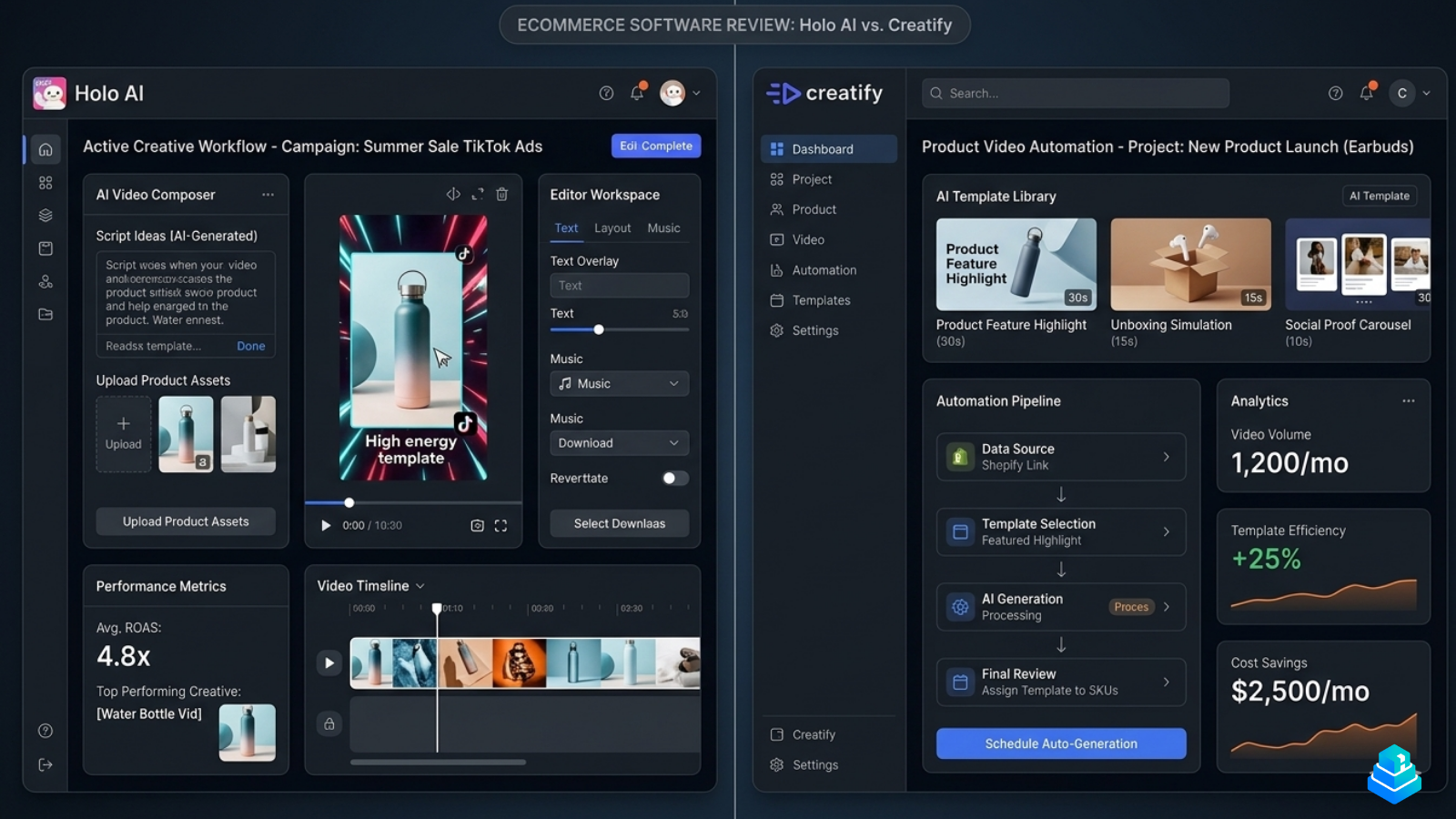
Holo AI and Creatify both target ecommerce video generation, but their workflows feel noticeably different once you move beyond the templates. One leans into operator-style creative iteration. The other leans into pipeline-style automation. Neither is universally better — they just answer different questions about how a brand actually produces ad creative week to week.
We tested both platforms across Shopify ad creatives, TikTok-style product videos, and ecommerce production workflows to understand where each one fits best. This comparison focuses on real workflow tradeoffs, not feature checklists.
Quick verdict
What each tool is actually built for
Holo AI
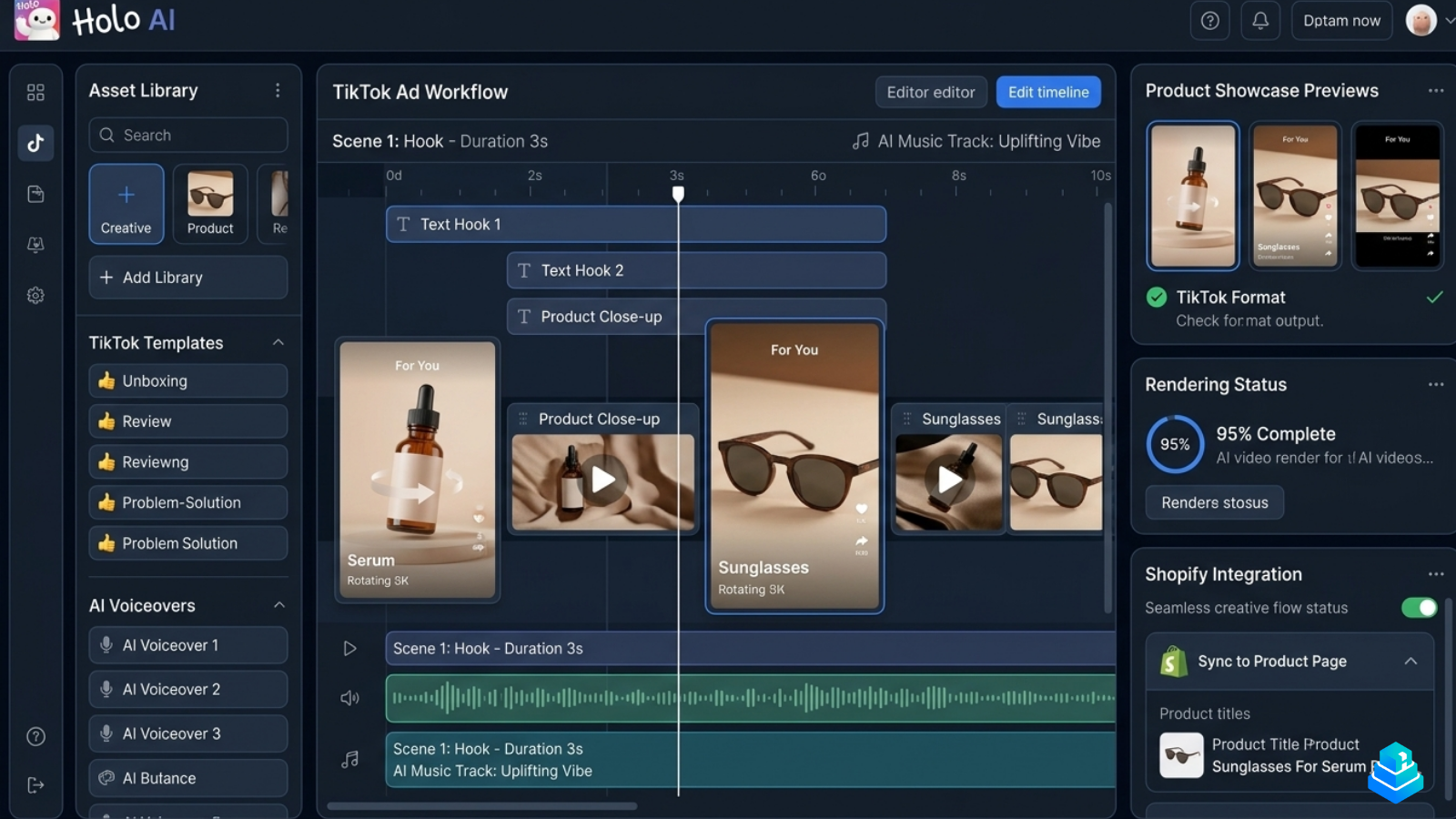
Holo AI is positioned around short-form ecommerce ad creation, with a heavy emphasis on TikTok-style hooks, scene-based timelines, and iteration on individual creatives. The dashboard reflects that — it opens directly into a creative workflow rather than a project queue, and most of the surface area is dedicated to scene editing, hook variations, and product showcase previews.
Creatify
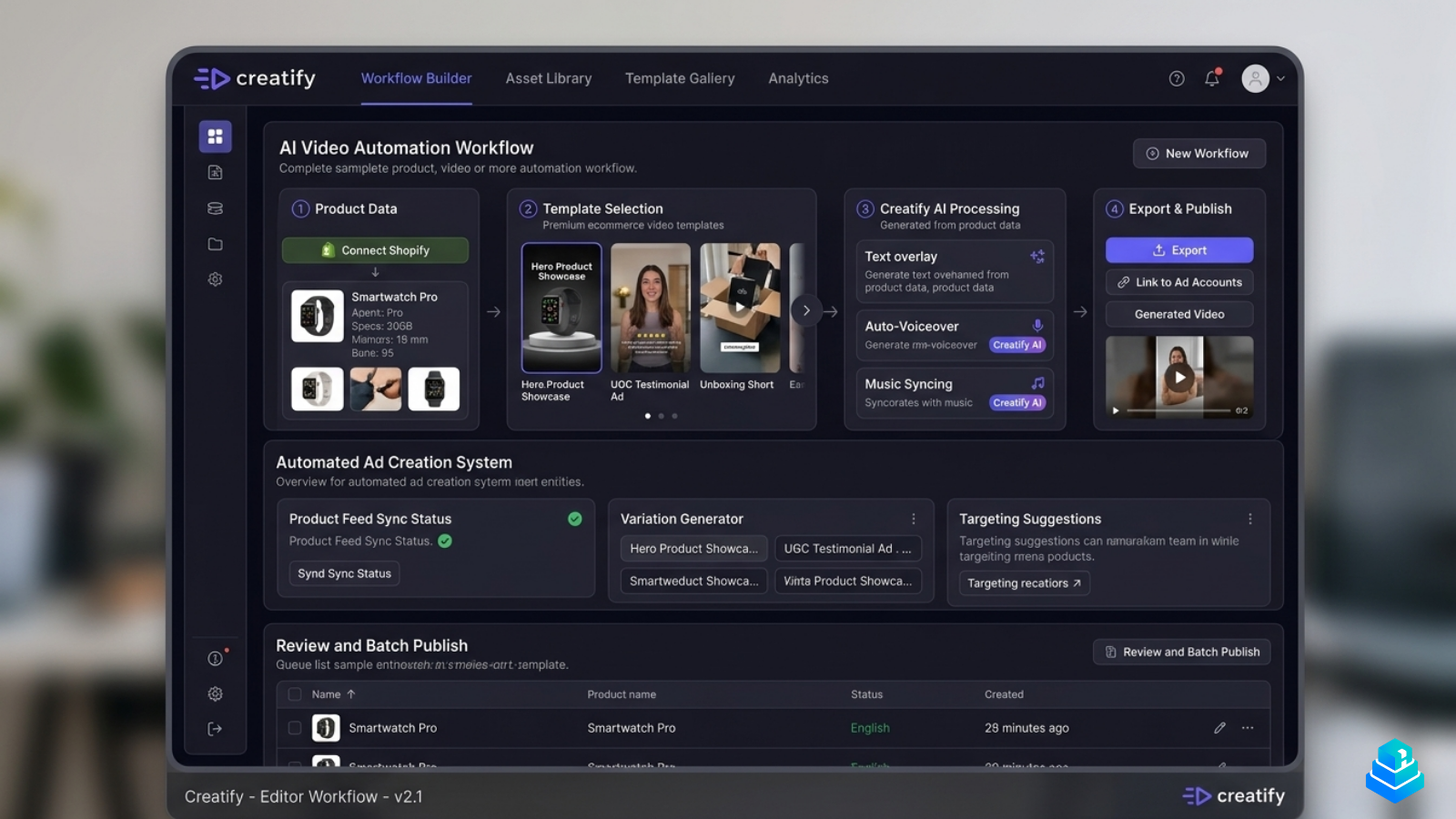
Creatify is built more like an automation pipeline. The interface is organized around stages — product data in, template selection, AI processing, export — and is clearly designed for teams that want to generate variations at volume rather than craft individual creatives. Shopify product feed sync sits at the top of the workflow rather than buried in settings.
Holo AI feels like an editor with automation bolted on. Creatify feels like an automation pipeline with an editor bolted on.
Our testing experience
We ran both platforms through the same brief: produce three TikTok-style ad variations for a single Shopify product (a skincare serum), then a second set for a sunglasses SKU. The goal was to evaluate onboarding, template quality, render time, and how much manual cleanup each output actually needed.
Onboarding & dashboard
Holo AI's onboarding pushes you straight into a workflow — connect a product, pick a hook style, and you're inside a scene editor within a few minutes. Creatify's onboarding leans more on connecting Shopify first; once the product feed is synced, it surfaces template recommendations rather than dropping you into an editor.
Template quality
Holo AI's templates are noticeably more opinionated — TikTok-native pacing, hook overlays, and product close-ups are baked in. Creatify's template library is broader but more generic; the strength is variety and the ability to batch-apply a template across many SKUs without opening each one.
Rendering speed
In our tests, Creatify was faster on bulk renders — a six-variation batch finished in under three minutes. Holo AI was slower per render but produced creatives that needed less manual editing afterward. That's a meaningful tradeoff: Creatify wins on raw throughput, Holo AI wins on usable output per render.
Limitations we noticed
Holo AI's timeline editor has a learning curve — it's powerful but not beginner-friendly, and some of the music and voiceover controls feel buried. Creatify's automation depth comes at the cost of fine-grained scene control; if you want to restructure a hook or swap a single scene without re-running the pipeline, it's clunkier than it should be.
Template & creative quality
Creative direction is where the two platforms diverge most clearly. Holo AI's TikTok-style templates lean into native short-form conventions — vertical framing, hook-first pacing, on-screen captions that match how creators actually edit. Creatify's templates are more broadly applicable across formats, with stronger UGC-style and unboxing presets that work well for top-of-funnel discovery ads.
For product showcase videos — clean, brand-led creatives rather than scroll-stopping hooks — Creatify's outputs felt more polished out of the box. For paid social hooks where the first two seconds carry the entire creative, Holo AI's structure produced more usable variants.
Editing workflow
Holo AI's timeline is scene-based and feels closer to a lightweight video editor — you can drag scenes, adjust durations, swap hooks, and preview music tracks in the same surface. Creatify's editing is template-driven; you can override text, voiceover, and assets, but structural changes generally mean re-running the workflow with different parameters rather than free-form editing.
For teams comfortable with a CapCut-style editing model, Holo AI will feel familiar. For teams that want creative output without thinking about timelines at all, Creatify's pipeline removes that overhead entirely — at the cost of flexibility.
Pricing comparison
Both platforms publish tiered pricing aimed at ecommerce operators and small creative teams. Holo AI's plans tend to be structured around render volume and seat count, while Creatify's plans emphasize template access and batch generation limits. Neither sits at the ultra-cheap end of the market — these are operator tools, not hobbyist apps — and pricing changes frequently enough that we'd recommend checking each platform directly before committing.
In practical terms, the cost question usually resolves to: how many usable creatives per month do you actually need? Teams generating high-volume variations will find Creatify's per-render economics more forgiving. Teams producing fewer, more-iterated creatives often get better mileage from Holo AI.
Which tool is better for ecommerce?
Both integrate with Shopify. Creatify's product feed sync is more automated; Holo AI's connection is lighter but more flexible for brands with custom creative needs.
Creatify's batch workflow is better suited to testing many SKUs quickly. Holo AI is overkill if you're spinning up creatives for products you won't keep.
Holo AI's hook-first structure aligns with how performance creatives are actually tested. Creatify is useful for generating top-of-funnel variants at volume.
Creatify scales better across many client accounts. Holo AI is stronger when each client needs custom creative direction rather than templated output.
Holo AI fits teams that already think in scenes and hooks. Creatify fits teams that want creative output without managing a timeline at all.
Pros & cons
- Strong TikTok-native creative structure
- Scene-level editing and hook iteration
- Less manual cleanup per render
- Slower on bulk renders
- Editor has a learning curve
- Some controls feel buried
- Fast batch generation across SKUs
- Strong Shopify feed automation
- Polished out-of-box product videos
- Limited free-form scene editing
- Templates can feel generic
- Re-runs needed for structural edits
Alternatives worth considering
Neither platform exists in a vacuum. Depending on how your creative workflow is structured, a few adjacent tools are worth evaluating alongside them.
- Canva — strongest for brand-controlled static and video creative where templates and team collaboration matter more than automation.
- InVideo — broad template library with solid AI scripting; less ecommerce-specific than either Holo AI or Creatify.
- CapCut — the editor most paid social teams already use for manual finishing; pairs well with either platform as a finishing step.
- Pictory — better for long-form repurposing (turning blog content or webinars into short-form clips) than for paid ad creative.
For a wider survey, see our roundup of the best AI video tools for ecommerce.
FAQ
In our testing, Holo AI produced TikTok-style hooks that needed less manual cleanup, mainly because its templates are structured around short-form pacing. Creatify can produce TikTok-style outputs too, but its strength is volume rather than format-native structure.
Creatify's product feed sync is more automated and surfaces SKU data directly inside the workflow. Holo AI's Shopify connection is lighter and gives you more control over which assets get pulled in, but requires more manual setup.
Creatify is more forgiving for non-editors — its template-driven model doesn't really expose a timeline. Holo AI is usable without editing experience but rewards teams comfortable with scene-based editing.
Creatify is faster on bulk renders. Holo AI is slower per creative but typically produces output that needs less editing afterward, which can offset the time difference depending on your workflow.
Neither fully replaces CapCut, Premiere, or DaVinci for finishing work. Both produce drafts that benefit from a quick manual pass, especially for higher-spend campaigns.
Creatify scales more naturally across many client accounts because its pipeline model handles repetition well. Holo AI is stronger when each client requires bespoke creative direction rather than templated variants.
Final verdict
For ecommerce operators prioritizing fast short-form ad iteration and Shopify-focused creative workflows, Holo AI feels more operationally focused — closer to how a paid social team actually works through hook variations. Creatify offers a broader template-driven workflow that may appeal more to teams prioritizing speed, batch generation, and automation across many SKUs.
Both platforms are credible choices in 2026. The right one depends on whether your bottleneck is creative iteration or creative volume — and there's no universal answer to that.
Explore both platforms
Read our independent reviews before evaluating either tool.