
AI WEBSITE BUILDERS · INDEPENDENT REVIEW
Readdy AI Review 2026: Features, Pricing, Pros & Cons
A website idea is easy. Getting it onto a page you can edit and publish is the hard part. Readdy AI brings generation, visual editing and hosting into one workflow—but the right plan depends on what you actually need to launch.
By Toolstacker Editorial · Updated November 3, 2026 · Official-source review, supplied product captures and independent analysis
Disclosure: Toolstacker may earn a commission if you purchase through links on this page. This does not affect our editorial assessment or the price you pay.
Quick verdict: a useful shortcut to a first website
Readdy is most compelling for small business websites and focused landing pages where a blank canvas is the main obstacle. Its strongest advantage is moving from an idea to an editable draft without stitching together separate design and hosting tools. Its biggest limitation is that convenience does not eliminate the work of checking the content, commercial requirements and plan limits.
- Best for
- Solo marketers, freelancers and small businesses launching focused sites.
- Main advantage
- Prompt generation, visual editing and publishing in one place.
- Main limitation
- Generated output needs review; complex operations require careful validation.
- Pricing consideration
- $25/month Starter includes one hosted site; $15/month is the one-year billing equivalent.
- Consider it if
- You want to test an offer or get a service website online without a custom build.
- Skip it if
- Your priority is a deeply customized app or mature ecommerce operations.
What is Readdy AI?
Readdy is an AI website builder, not simply a writing assistant. You give it a description of a business or page, and it generates website structure, visual design, copy and images. Its official FAQ also lists starting from templates, screenshots or URLs. You can then edit the result and publish through the platform.
A traditional website builder usually starts with a template and asks you to arrange sections manually. Readdy puts generation first: the first layout is produced for you. That changes the starting point, not your responsibility for the finished website. Hosting, domains, forms and a paid-plan backend expand what you can do after generation.
For an offer page or local service site, that is a practical scope. For a complex application, assess the backend and integrations against your requirements rather than assuming an AI-generated preview is production-ready.
How Readdy AI works: idea → draft → edit → publish
The workflow has four stages. The most useful input is a clear brief: explain who the page serves, what you sell, what makes it credible and what action visitors should take.
1. Describe your website idea
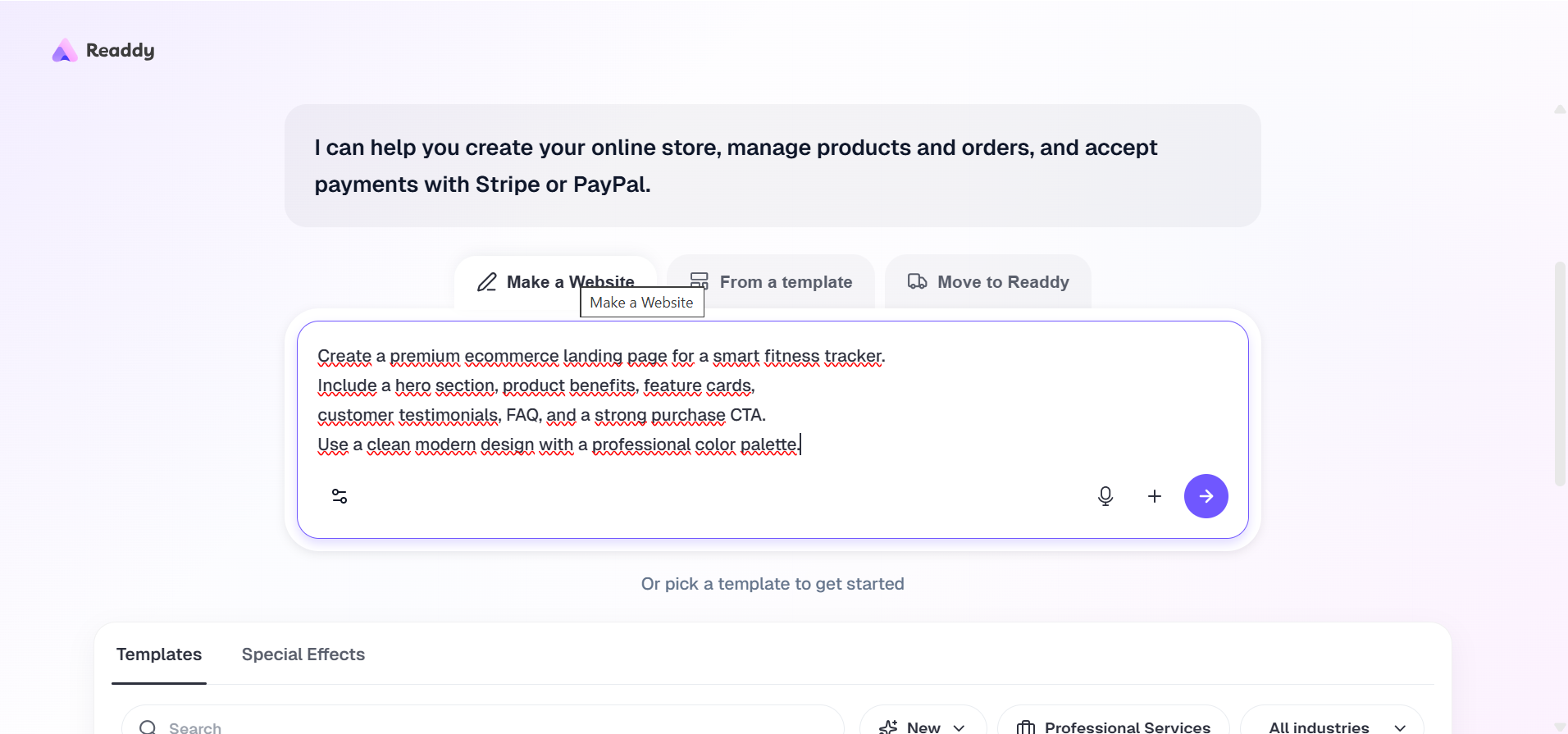
Include the audience, offer, brand direction, desired pages and primary CTA. Provide real prices and product details. You can also start from a template instead of an open-ended prompt.
2. Generate the initial website
Let Readdy create the first layout and content. Treat it as a draft to evaluate, not a guarantee of a finished site. Keep an eye on your credit balance as you iterate.
3. Customize the design and content
Use chat for specific revisions and the visual tools for direct edits. Replace incorrect imagery, verify claims, inspect forms and review desktop and mobile views.
4. Publish your website
Choose the appropriate publishing plan, connect your domain if needed and publish. Open the public URL and test every important action before directing customers to it.
Timing evidence: the supplied editorial brief attributes approximately 90 seconds to a first draft and approximately eight minutes to a completed fitness-tracker page to an earlier EcomStacked write-up. The previously published EcomStacked review reports these times; we have not independently reproduced that experiment, so those figures are not a Toolstacker benchmark or a promise of your results.
See what Readdy AI can build
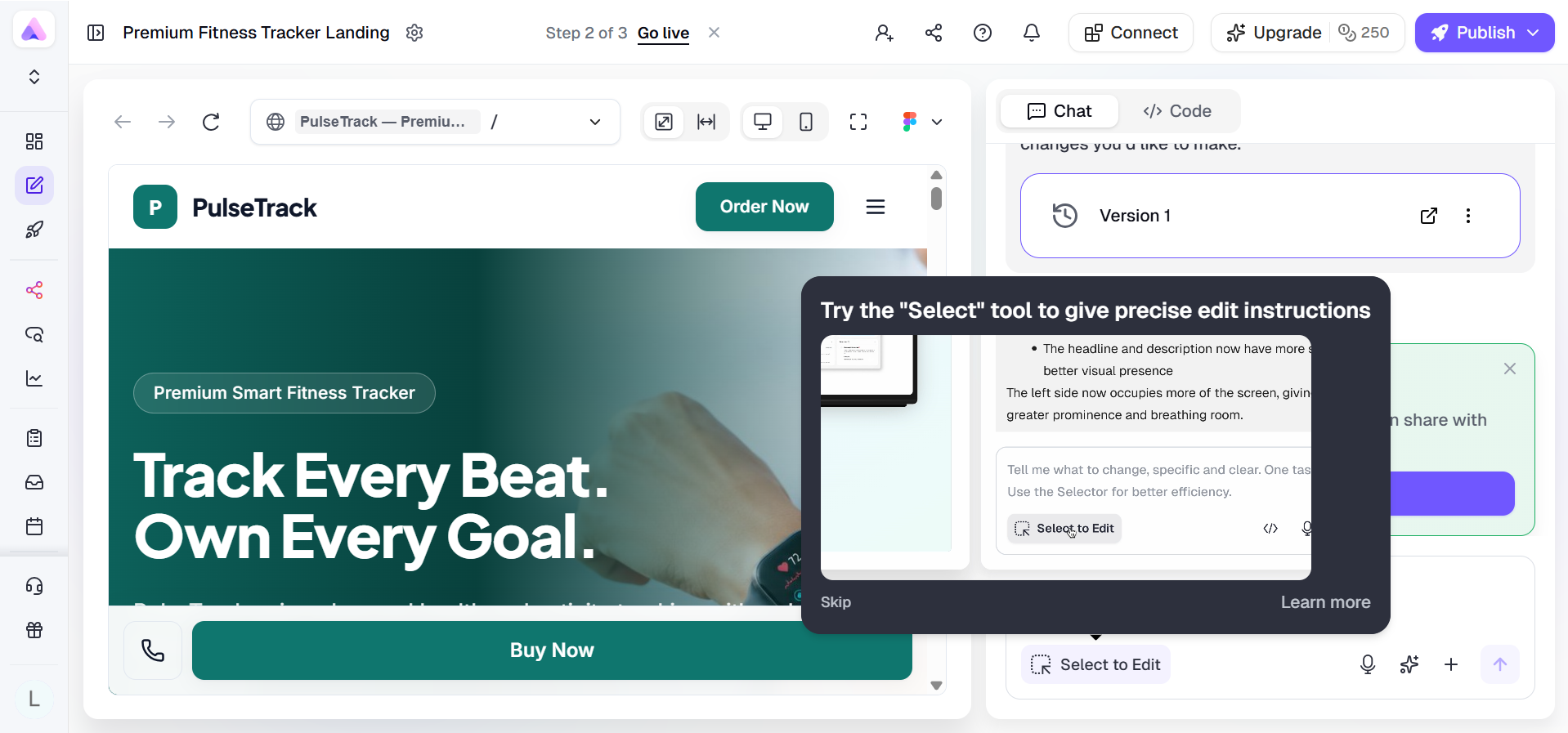
The supplied editor image shows a fitness-tracker concept with a navigation bar, product headline and purchase CTA. It proves that a website draft exists inside the editor. It does not establish checkout functionality, a live domain, customer results or the quality of the entire page below the visible area.
A product landing page can organize a hero, benefits, features, evidence, FAQs and calls to action. A service website can use the same workflow for service descriptions and lead capture. Marketers can create different angles—convenience, a specific use case or an objection—and test them against real traffic.
Keep the offer constant when testing a message change, and measure actual visitor behavior. A generated layout does not automatically increase conversions. No finished-site screenshot has been supplied for this review; we do not present the separate Fitbit retail image as Readdy output.
Mobile responsiveness: generated does not mean checked
Readdy's official FAQ says websites are mobile-responsive by default and the mobile view can be customized separately. That is a useful capability for anyone buying search traffic, because a page that works only on a laptop wastes mobile visits.
Check the menu, headline wrapping, tap targets, button placement and image scaling on a real phone. Make sure a sticky purchase button does not hide a form or cookie notice. Review long tables and product details, not just the first screen. No verified same-site desktop and mobile captures are available, so we cannot validate the PulseTrack example's mobile behavior from the supplied evidence.
Key features—and the limits that matter
AI website generation
Describe the business, audience and pages you need. Readdy says it can generate layouts, copy, images and a design system from text, templates, screenshots or URLs. This makes a useful starting point for a solo marketer who would otherwise assemble a page from scratch.
Buyer check: A first draft is not a finished offer. Supply accurate product details and inspect every section; AI can produce plausible but unsupported claims.
Natural-language editing
Ask for changes in the chat, such as a clearer headline or a different section order. The supplied editor capture shows a Select to Edit control for more targeted instructions. This helps nontechnical owners iterate without writing CSS.
Buyer check: Keep requests specific and review the effect after each change. Repeated AI revisions can consume credits, and a broad request may affect more than you intended.
Visual customization
The official pricing FAQ describes drag-and-drop editing of text, images, layouts, colors and spacing. A visual pass matters when you want the generated site to reflect a real brand rather than a generic starting point.
Buyer check: A no-code editor does not imply unlimited control over every interaction. For exacting art direction, compare the actual editing tools with Framer or Webflow before committing.
AI copy generation
Readdy generates page content alongside the design. Freelancers and small businesses can use that draft to organize benefits, FAQs and calls to action instead of staring at an empty canvas.
Buyer check: Review tone, product specifications and legal claims yourself. Never publish AI-written customer testimonials, certifications or guarantees unless they are genuine and documented.
Image generation
AI-generated imagery can help establish an initial visual direction. It is useful for early concepts when the final product photography has not yet been organized.
Buyer check: Replace inaccurate product images and invented interfaces with genuine assets. Review rights and suitability before using generated images in a commercial campaign.
Hosting and publishing
Readdy documents one-click publishing with hosting, SSL and speed optimization. This can simplify launching a service website without separately configuring a hosting account.
Buyer check: Check the included site allowance: editable projects and hosted sites are different limits. Test the live URL, contact forms, links and analytics before buying traffic.
Custom domains
You can connect a domain you own or buy a domain in Readdy. Paid plans currently list one free custom domain, which helps a business publish on its own brand address.
Buyer check: Confirm the eligible domain, registration term, renewal price and DNS setup. A free-domain offer should not be interpreted as permanently free renewals.
Forms and lead collection
The pricing page lists monthly lead collection limits: 1,000 on Starter, 10,000 on Pro and Agency, and 30,000 on Agency Pro. This gives service businesses a concrete capacity to budget around.
Buyer check: Submit a real test lead and confirm delivery, consent handling and notification settings. A visible form is not proof that your sales follow-up is connected.
Backend capabilities
Paid plans list Readdy Backend for databases, functions and secrets without external setup. That is a meaningful step beyond a static page for businesses needing stored data or lightweight dynamic behavior.
Buyer check: The backend guide says the Functions module does not provide local debugging, monitoring, migration management or backup/restore. A listed backend is not evidence that every complex application requirement is covered. Evaluate permissions, sensitive-data handling, integrations and maintenance before relying on it for critical operations.
SEO and analytics
Readdy documents editing meta titles, metadata, URLs, a sitemap and on-page content. Its analytics guide documents visitors, page views, referrers, devices and lead conversions; Agency adds AI SEO Analysis and Pro lists AEO/GEO. These help owners prepare and monitor a site.
Buyer check: The Page Settings guide limits those settings to React projects published on a custom domain. Tools do not guarantee search rankings or AI citations. Verify tracking consent, event setup and reporting coverage on your actual published site; plan-specific details matter.
Code export
Starter and higher plans list Export Code. Agency Pro and Ultimate additionally list GitHub. Export can give a freelancer a handoff path outside the hosted platform.
Buyer check: Export produces a source-code snapshot; migration of hosted data, authentication or platform services is not established. Exporting does not remove the need for hosting, dependency maintenance or development help. Test the exported project before promising a client complete portability.
Ecommerce capabilities
The supplied prompt screen offers products, orders and payments through Stripe or PayPal, and Readdy's Shop guide documents Stripe checkout, product administration, inventory and orders. PayPal appears in the supplied prompt-screen message; that alone does not verify PayPal in the native Shop workflow. This is relevant to marketers exploring a focused storefront or product page.
Buyer check: Do not mistake a polished product page for a complete retail operation. The Shop guide says Stripe redirects must be tested outside the embedded preview, refunds are handled in Stripe, and third-party logistics are not integrated; shipping details are entered manually. Verify payment availability, tax and required integrations. Shopify remains worth considering for established commerce workflows.
Readdy AI pricing: compare the commitment, not just the headline
We checked the official pricing page on November 3, 2026, including its Monthly and 1 Year displays. All six plans below are currently listed. Prices are displayed in dollars; confirm the checkout currency, taxes, current offer and any add-ons before subscribing.
| Plan | Monthly billing | 1-year equivalent | Monthly credits | Annual credits | Sites / projects |
|---|---|---|---|---|---|
| Free | $0/mo | $0/mo | 250 | 250/month | 0 sites / 2 projects |
| Starter | $25/mo | $15/mo | 2,500 | 30,000 upfront | 1 sites / 10 projects |
| Pro | $40/mo | $24/mo | 6,000 | 72,000 upfront | 2 sites / 50 projects |
| Agency | $120/mo | $72/mo | 18,000 | 216,000 upfront | 6 sites / 150 projects |
| Agency Pro | $199/mo | $119/mo | Unlimited | Unlimited | 10 sites / 250 projects |
| Ultimate | $1299/mo | $779/mo | Unlimited | Unlimited | Unlimited sites / Unlimited projects |
Annual means an annual commitment. Starter's $15/month equivalent is $180 for a year, versus $25 paid month to month. Pro is $288/year, Agency $864/year, Agency Pro and Ultimate display rounded equivalents of $119 and $779/month; the plans guide gives $119.40 and $779.40, implying $1,432.80 and $9,352.80 per year. Confirm the final checkout total instead of multiplying the rounded card price. Finite annual credit allocations are provided upfront. The official page also offers two- and three-year options; the table intentionally separates only monthly billing and one-year equivalents.
| Plan | Lead collection | Selected features | Recommended user |
|---|---|---|---|
| Free | Not listed | 200 MB storage; 1 editor; no paid hosted site included | Evaluate generation |
| Starter | 1,000/month | 1 GB storage; backend; code export; 2 editors | One business or offer site |
| Pro | 10,000/month | 5 GB storage; backend; code export; AEO/GEO | Solo professional |
| Agency | 10,000/month | 10 GB storage; 5 editors; client management; AI SEO analysis | Growing client roster |
| Agency Pro | 30,000/month | 20 GB storage; 10 editors; GitHub; white labeling | White-label agency |
| Ultimate | Unlimited | Unlimited storage; 50 editors; reseller mode | Large agency operations |
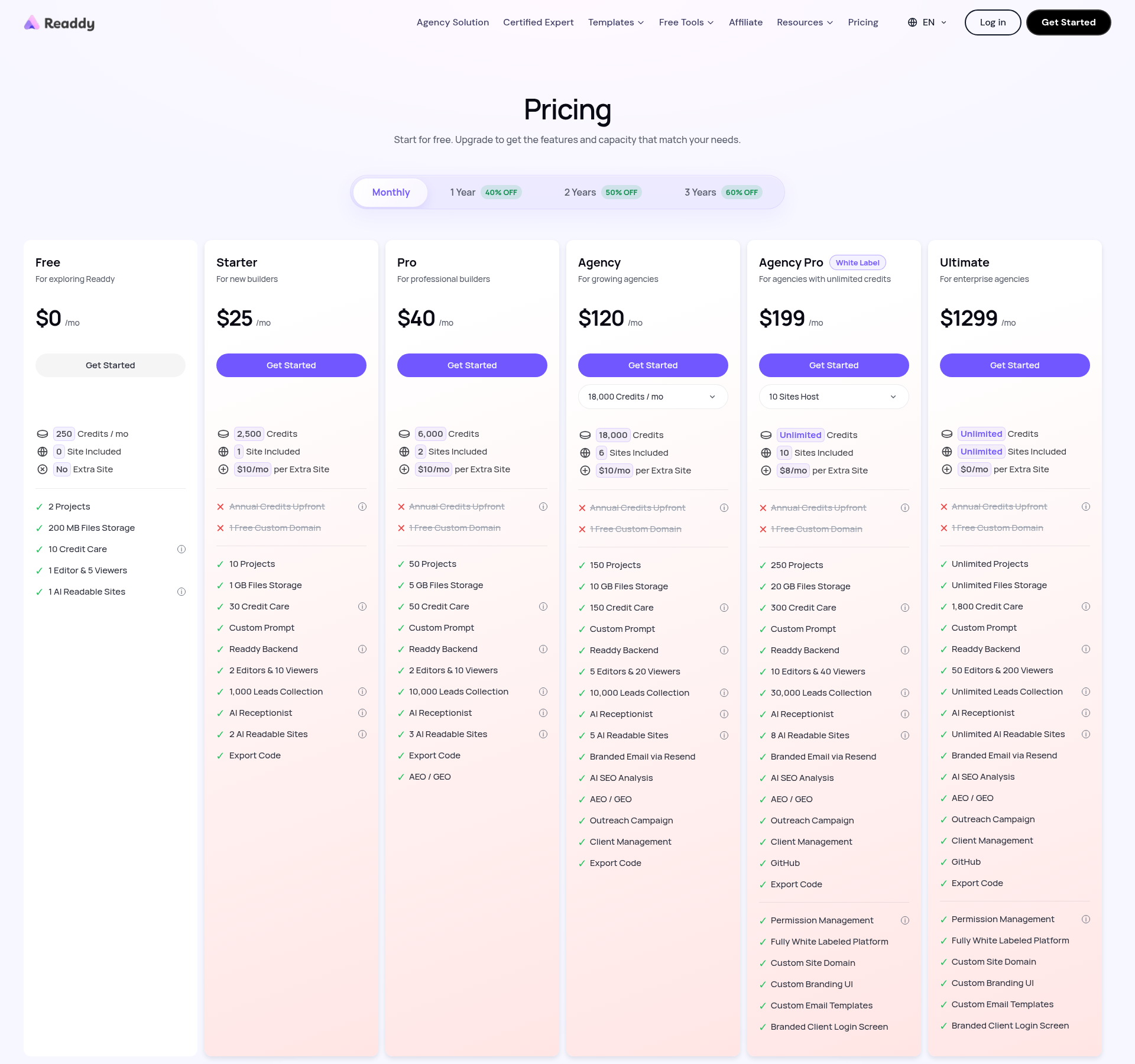
Paid pricing cards list one free custom domain, but the domain guide ties the benefit to yearly plans. Confirm eligibility before assuming a month-to-month subscription includes it. Additional hosted sites currently show $10/month on Starter, Pro and Agency with monthly billing, versus $6/month on one-year billing. Agency Pro shows $8/month versus $4.80/month respectively. Ultimate lists unlimited sites. A project limit is not the same as a publishing allowance, and “unlimited credits” is not a promise of unlimited infrastructure or every feature without conditions.
Official-source discrepancies to check
The public pricing cards and documentation disagree on some allowances: Free projects (2 versus 1), Agency projects (150 versus 200), Agency Pro projects (250 versus 800), and Starter form submissions (1,000 versus 50 monthly). This review follows the public offer cards, not a combined best-case figure. The plans guide also documents additional Agency configurations. Confirm the selected configuration, domain benefit, form allowance and exact annual total before paying.
Which Readdy AI plan should you choose?
- Free: Test the platform.
- Starter: Launch one business or offer website.
- Pro: For professional users managing more sites.
- Agency: For growing client operations.
- Agency Pro: For white-label agency workflows.
- Ultimate: For large-scale operations.
Beginners: use Free to test whether you like the generation and editing workflow. Its zero included hosted sites makes it an evaluation tier, not a substitute for checking publishing costs.
Solo marketers: Starter is the first plan to compare for one site. Watch actual credit use before deciding annual billing is a saving rather than an unnecessary commitment.
Professional builders: compare Pro when you need two included sites, more projects and more credits. Code export is already listed on Starter, so do not upgrade solely for that feature.
Agencies: compare Agency's six sites with Agency Pro's ten sites, white labeling and GitHub. Ultimate is a specialized high-cost option, not the default recommendation for a small client roster.
Disclosure: Toolstacker may earn a commission if you purchase through links on this page. This does not affect our editorial assessment or the price you pay.
Honest pros and cons
What works in its favor
- Fewer tools to assemble before getting an editable first draft.
- Prompt-based generation lowers the blank-canvas barrier.
- Visual editing and chat revisions work in one workspace.
- Hosting, domains and paid-plan backend features are listed together.
- Code export is available from Starter upward.
Where to be careful
- Generated copy and imagery still need factual and brand review.
- Credit use and revision volume affect the value of a plan.
- Projects, hosted sites and monthly lead capacity have separate limits.
- Complex application logic needs more validation than a visual preview.
- Commerce features should be checked against your full operational needs.
Before and after: design improvement is not conversion proof
A disorganized landing page can bury the offer, repeat vague benefits and make the next step hard to find. A more organized page makes the headline concrete, establishes a visual hierarchy, groups related information and puts the CTA where the visitor can act.
Spacing, feature organization and mobile readability support that clarity. They do not establish a conversion lift on their own. The requested before/after infographic was not included in the available collection, so we do not manufacture a comparison or claim a measured experiment.
For a meaningful assessment, compare the same offer on the same device, with the same traffic source. Then measure outcomes such as qualified lead submissions, not merely whether the second design looks newer.
Readdy AI vs Framer, Wix and Lovable
Choose the tool around the project, not around a universal winner. Readdy's focus is a generated business website; the others have different centers of gravity.
| Platform | Purpose & workflow | Ease / design control | Backend / commerce | Price entry | Best fit |
|---|---|---|---|---|---|
| Readdy AI | Prompt-to-site; visual editing | Accessible first draft; review required | Paid backend; ecommerce workflows | $0 evaluation; Starter $25/mo or $15/mo annual | Focused business and offer sites |
| Framer | Design-led websites; visual canvas | Fine visual control; design learning curve | CMS and integrations; check commerce setup | Free; Basic $10/mo with yearly billing | Brand-led marketing websites |
| Wix | Business sites; AI setup and editor | Broad editing and business tools | Commerce and app ecosystem; plan dependent | Free; Light $17/mo annual; Core $29/mo annual (regional) | Businesses needing integrated operations |
| Lovable | Prompt-to-application; iterative editing | Easy start; technical judgment for complex apps | Application data and integrations; validate permissions | Free; Pro $25/mo or $21/mo annual (official guide) | Interactive web applications and MVPs |
Framer is worth evaluating when detailed visual control is your priority. Wix deserves attention when your site needs established business tools. Lovable is a more relevant comparison for application behavior rather than a single marketing page. Framer Basic and Wix prices shown are annual equivalents, not verified month-to-month prices. Wix Core is the relevant listed entry for payments/basic ecommerce. Lovable Pro comes from its October 2026 official guide; its live paid checkout was not verified. Confirm all current subscription terms.
Choose by the website you need
- Marketing landing pages: compare Readdy for a prompt-generated starting point with Framer for more deliberate visual art direction. Both still need a truthful offer and working tracking.
- Design-focused websites: Framer is the stronger starting comparison when precise visual control is the main requirement; assess its learning curve before choosing.
- Small business websites: Readdy suits a focused service or offer site; Wix is worth comparing when integrated business tools and ongoing operations matter more.
- Interactive web applications: Lovable is the more relevant starting point for application workflows, data and integrations. Validate permissions and required logic rather than judging only the preview.
For a broader application-building evaluation, read our independent Emergent AI review. None of these comparisons substitutes for testing the specific integrations your project needs.
Who should use Readdy AI?
Dropshippers
Consider Readdy for focused offer pages or campaign concepts. Validate checkout, product information and the connection to your store; do not assume the generated page replaces fulfillment operations.
Affiliate marketers
Use it to draft an offer-focused page with a clear CTA. Publish truthful reviews, visible affiliate disclosures and genuine evidence rather than AI-invented praise.
Small business owners
A service description, contact form and branded domain are a sensible starting scope. Test the lead flow before asking customers to rely on it.
Freelancers
The workflow can help produce a client draft and iterate on feedback. Agree on ownership, ongoing subscriptions, export and support obligations before handoff.
Startup founders
Use a landing page to explain an idea and collect interest. An MVP needing accounts, payments and business logic requires a separate technical evaluation.
Agencies
Multiple hosted sites, collaboration and higher-tier white labeling may be useful. Model cost per active client, including add-on hosting, instead of choosing a plan only for unlimited credits.
Who should not use Readdy AI?
Choose another platform when the core requirement is not an editable marketing website. Shopify is worth assessing for full commerce operations. WordPress can be a better fit for extensive content management and a specific plugin ecosystem. Webflow deserves a look when advanced visual control is central to the project.
For complex application workflows, compare Lovable, Emergent or traditional development around the required logic, security and integrations. Readdy's own official FAQ recommends a developer for complex custom applications and deep internal-system integrations. That is a useful boundary, not a criticism of simple-site use cases.
Is Readdy AI worth it in 2026?
The free plan is worth trying if you want to find out whether prompt generation gives you a useful starting point. A paid plan becomes more credible once you have tested the editor and know you need the included site allowance, domain, backend or export.
For landing pages: yes, it is a reasonable candidate. The important question is whether you can turn its draft into an accurate, readable page with working actions. For ecommerce, it depends on operational fit. For affiliate marketing, it depends on editorial integrity as much as visual output.
Choose another platform when the gap is structural—complex commerce, specialized CMS needs or application logic—not when the first AI draft simply needs clearer product information. Evaluate one real project before making a long-term commitment.
Frequently asked questions
What is Readdy AI?
Readdy is an AI website builder that creates layouts, copy and images from prompts, templates, screenshots or URLs. You can refine the result visually and publish with its hosting.
Is Readdy AI free?
Yes. The Free plan includes 250 monthly credits and two projects. The current pricing page lists zero included hosted sites on Free; do not assume a free project includes the paid publishing allowance.
How much does Readdy AI cost?
Monthly plans are Free $0, Starter $25, Pro $40, Agency $120, Agency Pro $199 and Ultimate $1,299. One-year billing equivalents are $15, $24, $72, $119 and $779 per month respectively for paid plans. Those are annual commitments, not month-to-month prices.
Can Readdy AI build landing pages?
Yes. Its prompt-based generation and visual editor suit product, service and campaign landing pages. You still need to check factual claims, forms, tracking and mobile presentation before sending traffic.
Can I use my own domain?
Yes. Readdy documents connecting an existing domain or buying one in the platform. Paid plans currently advertise one free custom domain; check eligible extensions, term and renewal charges before purchasing.
Does Readdy AI include hosting?
Readdy documents publishing with hosting and SSL. Included hosted-site allowances depend on the plan and differ from the number of editable projects. Extra sites can cost more.
Can Readdy AI build ecommerce websites?
Readdy supports ecommerce workflows, including products, orders and Stripe or PayPal payments. Verify your specific payment region, shipping, tax, catalog and integration requirements; do not assume feature parity with Shopify.
Can I export my website code?
Code export is listed on Starter and higher paid plans. GitHub is explicitly listed on Agency Pro and Ultimate. After export, external hosting and maintenance become your responsibility.
Is Readdy AI beginner-friendly?
The prompt and visual-editing workflow lowers the barrier to a first draft. Beginners still need to provide accurate business information and review the generated site before launch.
Is Readdy AI better than Wix?
It depends on the project. Readdy emphasizes prompt-to-site generation; Wix offers a mature business-site ecosystem with ecommerce and apps. Compare the integrations and operational requirements you actually need.
Is Readdy AI worth paying for?
A paid plan is worth considering when a free project proves useful and you need included hosting, a domain, backend or export. Start with the smallest plan that fits your site count and observed credit usage.
What are the best Readdy AI alternatives?
Framer suits design-led marketing sites, Wix suits integrated business websites, and Lovable suits application workflows. Shopify, WordPress and Webflow are also worth comparing for commerce, content management and advanced design respectively.
Ready to Build Your Next Website Faster?
Readdy brings a first website draft, visual editing and publishing into one workflow. It is most convincing for focused business sites and offer pages—not as a promise that every generated page is ready for customers without review.
Start free, try one real project and confirm the missing pieces before paying. If your needs center on advanced retail operations or a complex application, evaluate a more specialized platform. A finished website showcase was not supplied; this review does not claim the demo has been deployed or commercially validated.
Disclosure: Toolstacker may earn a commission if you purchase through links on this page. This does not affect our editorial assessment or the price you pay.
Sources and review methodology
Toolstacker is an independent publisher. This review combines official product information, the owner's supplied screenshots and our analysis. We did not independently build, deploy or run a paid campaign with the demo shown here. We have not measured conversion uplift or reproduced the EcomStacked timing test.
- Readdy official website — product positioning and capabilities.
- Official Readdy pricing — Monthly and 1 Year displays checked November 3, 2026.
- Readdy help center — workflow and setup reference.
- Plans documentation — configuration and rounding discrepancies.
- Shop documentation — checkout, refunds and logistics caveats.
- Backend documentation · Page settings · Analytics · Code export.
- EcomStacked editorial background — previously documented fitness-tracker workflow, not Toolstacker hands-on testing.
The eight named review graphics were not available. We used two supplied Readdy captures and a fresh official pricing capture. The illustrative responsive collage is excluded because it is not verified Readdy output. The separate Fitbit screenshot was excluded because it is not verified Readdy output. Missing workflow, before/after and completed-site graphics remain an evidence gap, not a reason to invent them.
Editorial policy · Product research tools · Emergent AI review